Startup Email Marketing Playbook: A Practical Guide
A practical startup email marketing playbook covering list building, segmentation, onboarding, growth campaigns, and the metrics that actually move revenue.
The most popular advice in startup email marketing is backwards. You're told to write clever subject lines, build a long sequence, and send more often. Do that first and you'll usually burn a fresh domain, train mailbox providers to distrust you, and learn nothing useful from inflated opens. Email works when you treat it as infrastructure first. Authenticate, earn permission, segment by behavior, and measure what happens after the click. Copy comes after those systems can carry it.
Why Most Startup Email Programs Stall Early
Most founders treat email like a broadcast channel. They collect addresses anywhere they can, import them into Mailchimp or Customer.io, and blast a launch announcement. A few sends later, replies dry up, Gmail starts filtering aggressively, and the team concludes email doesn't work for their market.
That diagnosis is wrong. The channel didn't fail. The sender never built the conditions mailbox providers require to trust them.
Consent Is Not a Legal Footnote
Email became a regulated channel because abuse arrived first. Spam represented approximately 50% of all email in early 2003 and rose to around 75% by the time CAN-SPAM was passed in December 2003, establishing the consent, identification, and opt-out standards modern programs still depend on, as detailed in the Congressional Research Service history of CAN-SPAM. That law took effect on January 1, 2004 and required truthful headers, nondeceptive subject lines, advertising identification, and a functioning opt-out.
Those requirements aren't paperwork you handle after growth. They're the operating model. A startup that can't prove who it is, why it's mailing someone, and how that person can leave will struggle regardless of offer quality.
Practical rule: If you wouldn't be comfortable explaining to a subscriber exactly how you got their address, don't send to it.
The Founder Fantasy Versus the Working Sequence
The fantasy says volume creates learning. In practice, volume on a weak foundation creates complaints, bounces, and a reputation you have to repair while also trying to sell. Small senders have less margin for error because every complaint represents a larger share of their total volume.
A working startup email marketing program follows a narrower order:
- Authenticate first: Prove your domain is authorized to send before you scale.
- Earn permission: Capture addresses through a clear exchange of value, not scraping.
- Segment by behavior: Send based on what people did, not just who they are.
- Measure downstream: Judge sends by clicks, activation, and revenue, not opens alone.
That sequence also has to fit your wider startup marketing strategy, because email can't compensate for unclear positioning or a weak offer. It amplifies what already works. If nobody wants the product, a larger list only gives you faster negative feedback, and mailbox providers will record that feedback even if your team ignores it.
I've seen teams recover by sending less. They cut dormant contacts, stopped importing partner lists without fresh consent, and mailed only people with a recent, relevant reason to hear from them. Engagement rose because relevance rose. Their list looked smaller in a board update, but it finally produced replies, demos, and customers.
Setting Up Deliverability Before You Send a Single Email
Deliverability decides whether your work gets seen. Founders underestimate it because setup feels technical and invisible, while a campaign feels productive. Reverse that instinct. Spend the first hours on authentication and stream separation, then write copy.
The checklist below covers the setup you should complete before your first promotional send.
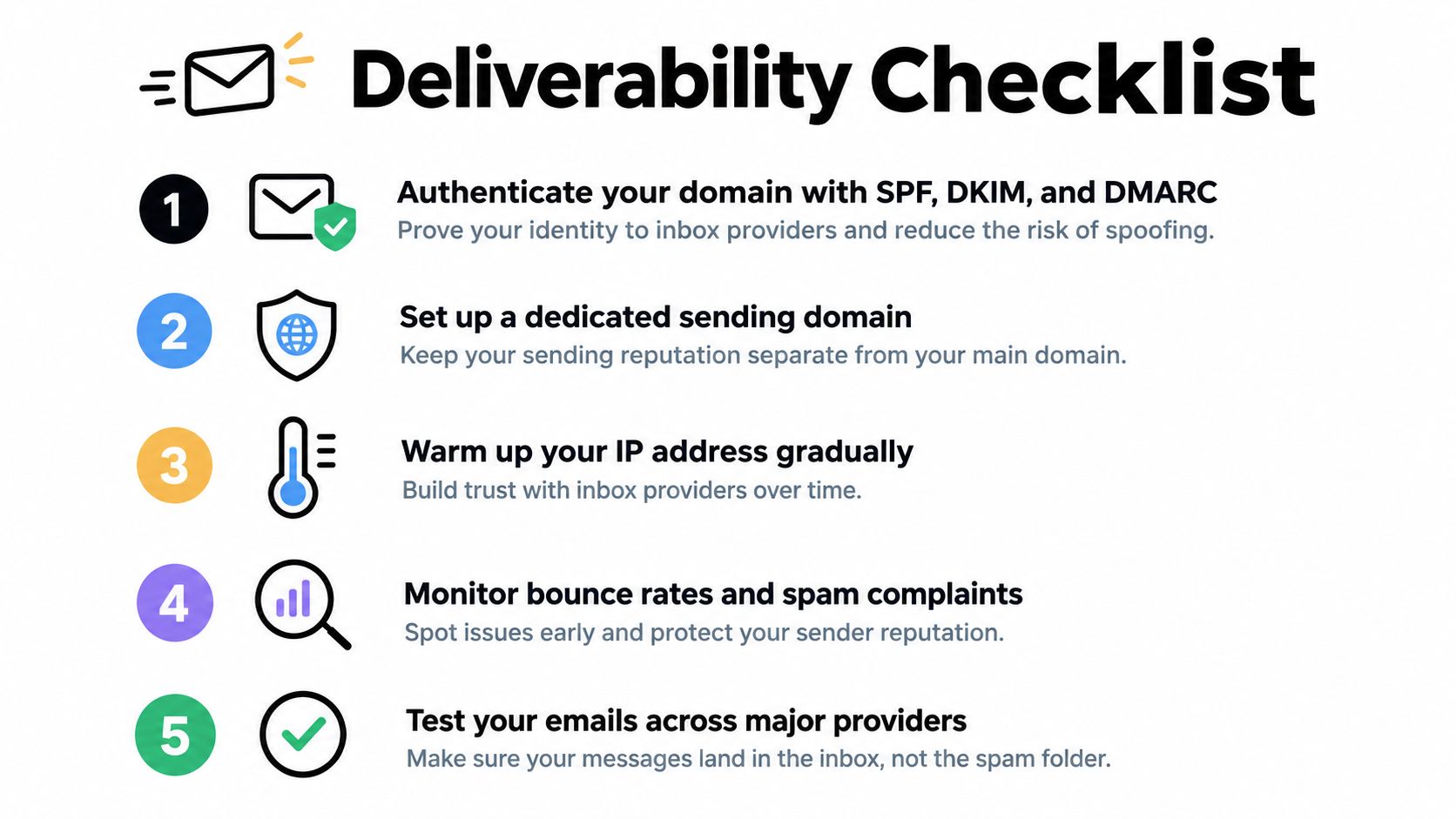
Publish the Three Authentication Records
Start with SPF, DKIM, and DMARC. They do different jobs, and treating one as a substitute for the others is a common startup mistake.
- SPF identifies infrastructure: It states which systems are authorized to send for your domain.
- DKIM signs the message: It gives receivers a cryptographic way to verify the message was authorized and not altered.
- DMARC sets policy: It tells receivers what to do when authentication fails and requires alignment with the visible From domain.
Publish DMARC with at least a monitoring policy such as p=none, then check reports before tightening enforcement. Gmail reports that senders typically achieve at least 95% DKIM and DMARC pass rates when configured correctly, while a Validity based benchmark found that 15.8% of legitimate email failed to reach the inbox in 2024, according to Mailgun's summary of authentication requirements. Legitimate doesn't guarantee delivered.
If you want a deeper walkthrough of reputation signals beyond authentication, the 2026 email deliverability guide from The AI CMO is a useful companion while you configure your provider.
Separate Streams and Choose an Opt In Model
Send transactional mail, such as receipts and password resets, from a different subdomain than marketing mail. A promotional complaint spike shouldn't damage messages customers actively need. Tools like Postmark, Resend, Customer.io, and Loops can support this separation, but the tool matters less than keeping the streams distinct.
For opt in, single opt in grows faster and suits low risk product signups where the user just created an account. Double opt in adds friction, but it gives you stronger proof of intent and fewer bad addresses from public lead magnets. I default to double opt in for downloadable resources and single opt in for verified product accounts.
Next, ramp gradually. Mail your most recent and engaged contacts first, watch bounces and complaints in your provider dashboard, and pause expansion when those signals worsen. Don't wait until you look like a bulk sender to act like one. Reputation forms from your earliest sends, whether you're mailing your first hundred people or several thousand each week.
Building a Permission-Based List From Zero
Buying or scraping a list feels like speed. It is deferred pain. Those contacts did not ask for your product, they complain at higher rates, and they teach providers that your mail is unwanted. A smaller permission based list gives you cleaner data and a sender reputation you can build on.
The illustration below captures the mix most early teams should brainstorm before they spend on ads.
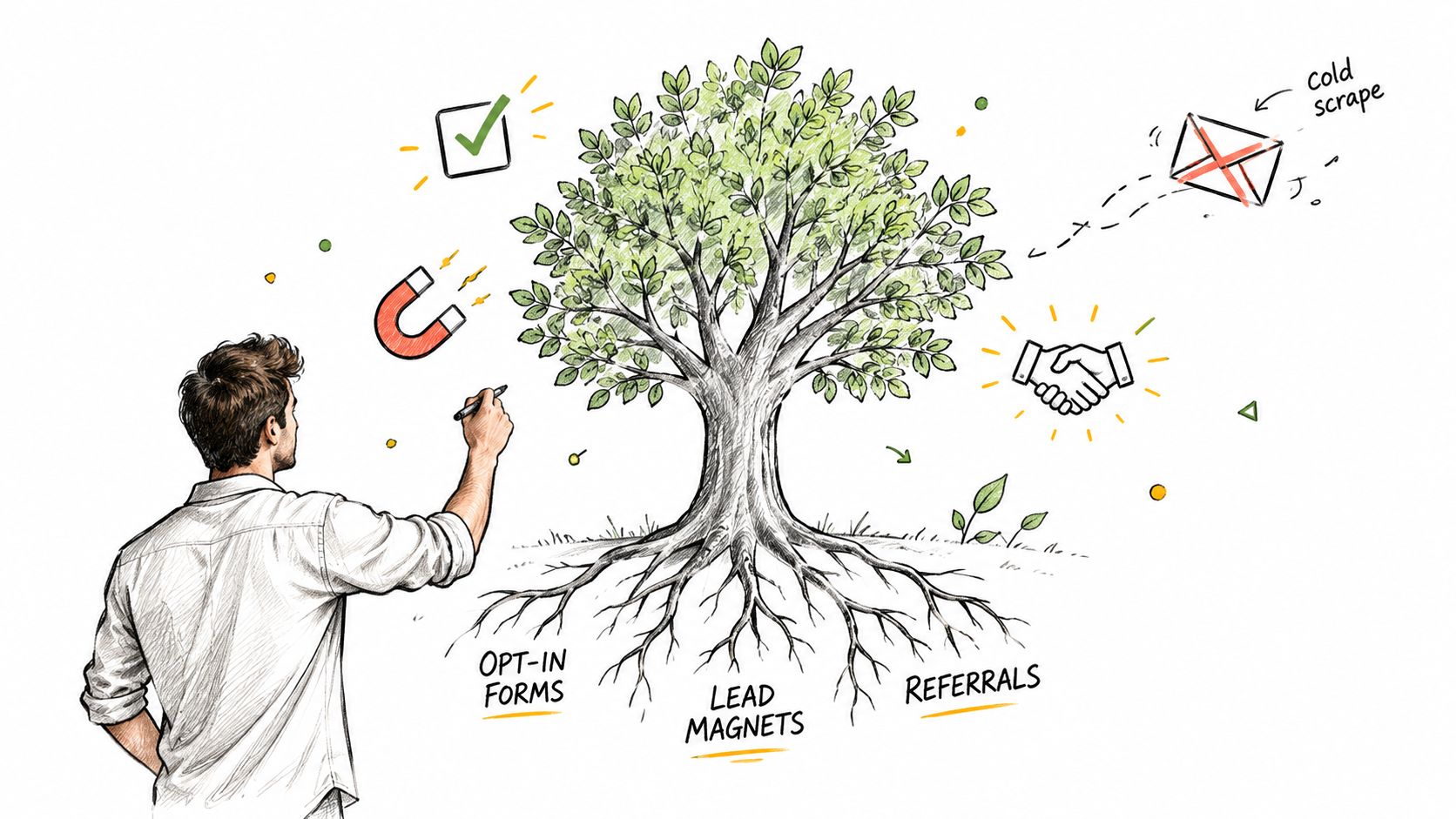
Three Acquisition Paths That Actually Work Early
Start with a lead magnet tied to a painful job. A one page teardown, a pricing calculator, or a checklist that solves a narrow problem will outperform a generic ebook. For a B2B SaaS startup, I'd rather ship a teardown of a common onboarding flow than a broad industry report nobody finishes.
Partner cross promotions come next. Find an adjacent newsletter or community whose audience shares your problem but doesn't compete for the same budget. Co create a checklist, run a joint session, or swap a clearly labeled recommendation. Researching where those audiences gather can start with online communities for market research, then move to direct outreach with a specific asset, not a vague request for exposure.
Product led capture is the strongest path once you have traffic. Let someone use a free tool, template, or diagnostic, then ask for email at the moment you deliver the output. The exchange is obvious, consent is fresh, and you know what problem brought them in.
Five hundred people who requested your teardown and clicked the follow up are worth more than a cold list many times larger that never asked to hear from you.
Why the Economics Justify Patience
A widely cited 2021 benchmark reported that 64% of small businesses used email marketing to reach customers, and industry research has estimated an average return of approximately $36 for every $1 spent, as summarized in Tabular's compilation of email marketing statistics. Treat that return as an aggregate benchmark, not a promise. Your result will depend on audience quality, offer, segmentation, and attribution.
Still, the logic holds for a lean team. You aren't renting reach for every message. You're building an owned audience you can contact again when you launch, learn, or need feedback. For practical hygiene and consent mechanics as the list grows, CleanMyList email marketing tips offers a helpful reference on keeping acquisition permission based.
Set one weekly growth target and record source for every subscriber. If a partner send produces signups who never click, stop celebrating raw additions. Quality is visible quickly in startup email marketing when you track source through to activation.
Segmenting Small Lists Without Sprawling Into Spreadsheets
Segmentation fails when a two person team tries to maintain a segment for every idea someone had in a planning meeting. Each segment needs a trigger, a message, and a reason to exist. If you can't write a different email for it, you don't need it yet.
Start with behavior and lifecycle. Persona helps later, once you have enough volume for the differences to matter and enough content to serve them.
The Three Segments Worth Building First
| Segment Type | Trigger Event | Primary Use | Minimum Tags |
|---|---|---|---|
| Lifecycle stage | Signup date, trial status, last activity | Send new, active, at risk, and dormant users different next steps | lifecycle, signup source |
| Behavior | Clicked pricing, used a core feature, started but didn't finish setup | Follow up on demonstrated intent | last action, feature used |
| Persona or company size | Role or firmographic data captured at signup | Adjust examples, proof, and offer framing | role, company size |
For a B2B SaaS startup, a workable starting set looks like this. New trial users who haven't completed setup get activation help. Active users who clicked pricing get a direct conversion email with a reply prompt. Dormant subscribers get nothing until a planned re engagement attempt, because mailing them weekly just to keep volume up only drags down your signals.
Operating constraint: If maintaining a segment requires a manual spreadsheet export every week, automate the tag or delete the segment.
Keep Tagging Rules Boring
Use your ESP or product analytics to apply tags from events, not from someone's memory. In Customer.io, HubSpot, or Loops, a rule can be as simple as this. When a user views pricing and hasn't started checkout, add a pricing intent tag and enter them into one follow up. When they convert, remove the tag and suppress them from prospect campaigns.
That discipline protects reporting. You can compare segments by downstream action and know who received what. It also prevents the classic small list problem where the same contact sits in several overlapping audiences and receives three versions of the same announcement.
Don't build persona segments from guessed job titles scraped off LinkedIn. Capture role at signup only if you'll change the message based on the answer. Extra form fields cost conversions, and unused data creates clutter. Three to five maintained segments will carry most early startup email marketing programs further than an elaborate taxonomy nobody updates.
Designing an Onboarding Sequence That Activates Users
Your onboarding sequence is not a product tour. Its job is to get a new user to the first moment of real value, then help them repeat it. Every email that lists features without moving the user toward that moment is friction.
The funnel below shows the four jobs your sequence needs to cover, in order.
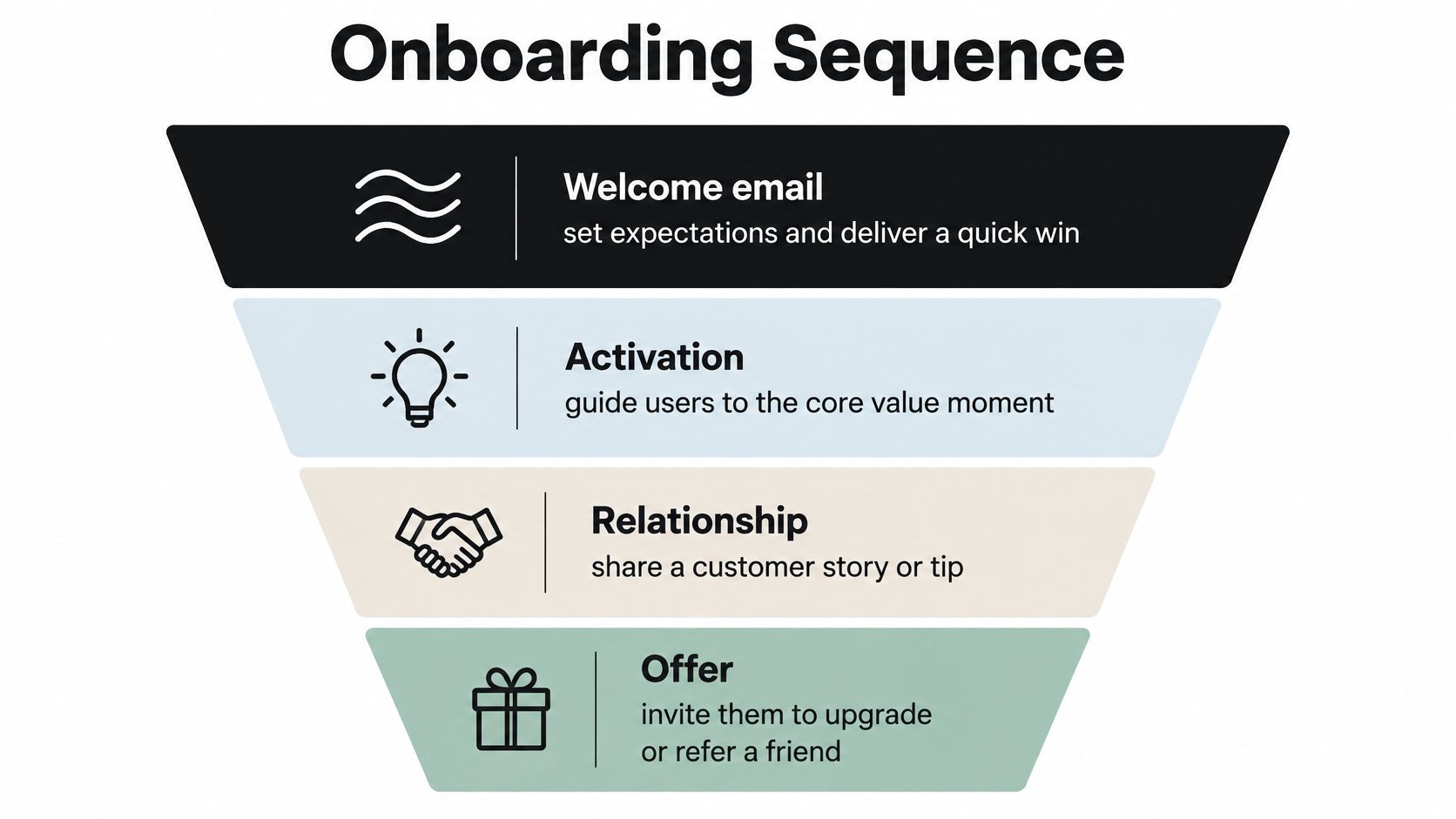
Welcome, Activation, Habit, Conversion
Send the welcome email immediately. Deliver what you promised, set expectations, and give one quick win. If someone joined for a template, the template link should be obvious before any brand story. If they started a trial, point them to the single setup step that unlocks value.
The activation email follows based on behavior, not just time. If the user hasn't completed the core action, show the shortest path and remove one objection. A short screen recording often beats a long explanation. If they have activated, don't send beginner instructions. Suppress them and move them forward.
Next comes a habit email. Share a customer story, a specific workflow, or a tip that helps the user repeat the core action in a real situation. A personal note from a founder asking for a reply can work well, provided a human reads and answers replies.
The conversion email arrives after value is visible. Invite the user to upgrade, book a demo, or refer a teammate, and make the next step singular. Multiple competing calls to action usually mean the team hasn't decided what success looks like.
The video below is a useful visual walkthrough to compare against your own sequence before you rebuild it.
Keep the full flow short enough that you can interpret behavior. When you test a change, change one variable and judge it on activation or qualified demos. A controlled email test used a chi squared test and obtained p=0.03, illustrating the conventional 95% confidence threshold teams should use before declaring a win, as shown in Shno's overview of A/B testing statistics. Don't rebuild the whole sequence because opens moved on a Tuesday.
The most common friction I see is asking for too much too early. A welcome email that asks a new user to read a manifesto, join a community, book a call, and complete a profile will lose to one clear action. Startup email marketing works best when each message earns the right to send the next one.
Running a Growth Campaign Without Nuking Your Reputation
A launch day blast is where careful setup gets destroyed. The team has waited weeks, leadership wants reach, and someone suggests mailing everyone who ever touched the product. That instinct is understandable. It's also how a startup turns its best news into a deliverability problem.
The process below shows a safer way to scale a growth send without treating your whole list as one audience.
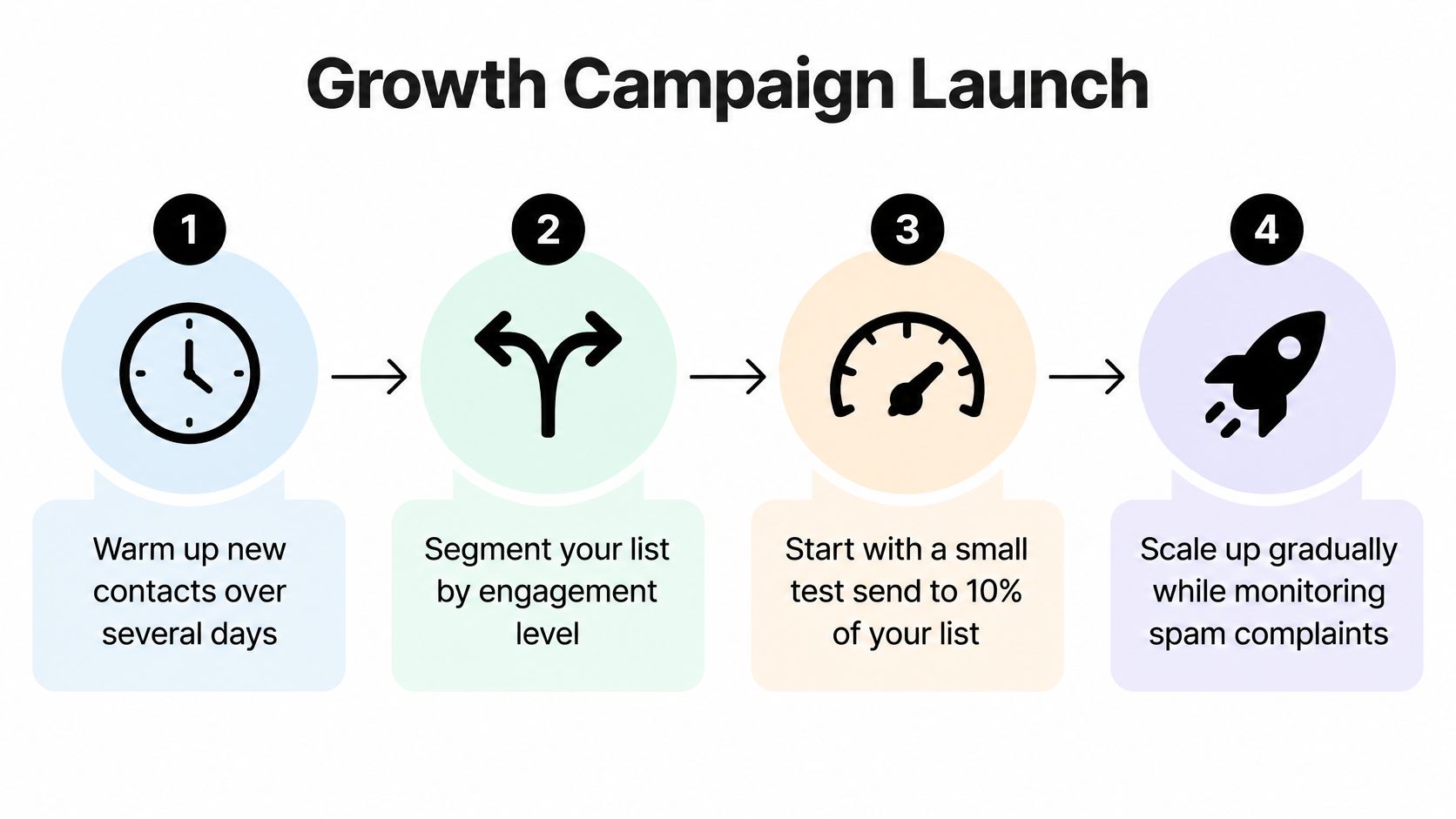
A Launch Send Done in Stages
Start with recent, engaged subscribers and customers who have a clear reason to care. Watch complaints, bounces, and clicks as results arrive. Then expand to the next tier only if those signals stay clean. This gives you a failure threshold before emotion takes over. If complaints spike in the first batch, pause, inspect the audience and message, and don't push the rest out hoping volume will average away the problem.
Gmail inbox placement averaged 89.8% in early 2024 but fell to 84.2% by Q4, showing that sender reputation can deteriorate materially even before a startup becomes a large scale sender, according to the Validity 2025 benchmark report. A gradual ramp isn't caution for its own sake. It's how you detect trouble while you can still contain it.
Separate the types of growth sends in your planning. A promotional campaign pushes an offer. A launch announcement explains what's new and who it's for. A re engagement sweep asks dormant subscribers whether they still want mail. Mixing those jobs into one blast makes the message vague and the results impossible to read.
Your launch timing should also connect to a documented go to market example or your own launch plan, so email supports sales, product, and support capacity instead of surprising them. If a demo offer succeeds, someone has to run those demos. If a trial push works, onboarding has to handle the surge.
Handle dormant contacts separately. Give them a clear choice, a useful reason to return, and an easy exit. If they don't respond, suppress them. Keeping unengaged addresses on every send flatters list size and lowers the share of mail that reaches people who want it. A campaign compounds when each send leaves your reputation intact for the next one.
Measuring What Actually Matters for a Small Email Program
Open rate used to be the headline. It shouldn't be yours. Apple Mail Privacy Protection can preload tracking pixels, which inflates opens and distorts send time optimization, open based segmentation, and automated journeys. You'll make confident decisions from synthetic activity if opens sit at the top of your dashboard.
Recent deliverability guidance identifies clicks, conversions, revenue per recipient, replies, and complaints as more durable metrics than opens, reflecting the impact of privacy driven pixel blocking, as noted in Market Intelligence Tools' email marketing statistics report. That doesn't mean opens are useless. Treat them as a noisy diagnostic. If opens collapse suddenly alongside clicks, investigate deliverability. If opens rise while clicks stay flat, don't call it growth.
Build a Dashboard a Cofounder Can Challenge
Your weekly view for startup email marketing should fit on one screen and answer commercial questions:
- Unique clicks: Did the message motivate action beyond a preload?
- Completed activation events or qualified demos: Did email move product outcomes?
- Revenue or retention per recipient: Did the send create value relative to audience size?
- Qualified replies: Did prospects start useful conversations?
- Unsubscribe and complaint rate: Is the program damaging future reach?
- Assisted conversions: Did email contribute before another touch closed the deal?
If you need a quick way to sanity check revenue per recipient and conversion math without building a spreadsheet first, the email performance tool from SourceLoop can help you model the inputs before you formalize reporting in your ESP or analytics stack.
Review metrics by segment and source, not just campaign totals. A partner acquired cohort that clicks but never activates tells a different story from product signups who activate but don't upgrade. Aggregate numbers hide both problems.
Test on Small Lists Without Fooling Yourself
Run controlled tests in sequence. Define one primary outcome, pick one variable, randomize subscribers, and keep audience, send window, and follow up rules constant. Decide the minimum improvement worth acting on before you send, then evaluate conversion with a two proportion or chi squared test at a 95% confidence threshold, commonly p<0.05.
Small lists need bigger swings. A tiny subject line tweak may require more recipients than you can provide, while a different activation call to action or a restructured onboarding step can produce a detectable downstream effect. Prioritize high intent behavioral segments, such as pricing viewers or trial users who stalled during setup, because their baseline intent makes learning faster.
Don't keep peeking at results and stop the test the first time your preferred variant looks ahead. Repeated checking inflates false positives.
Statistical significance also isn't enough. A real but tiny lift may not justify design, engineering, or maintenance cost. Ask whether the change improves activation, qualified pipeline, or revenue enough to keep. If it only improves opens, archive the result and move on.
A Ninety Day Rollout for a Two Person Team
Use the first phase for foundations. Authenticate your domains, separate transactional and marketing streams, fix opt in and unsubscribe flows, and ship one welcome email that delivers a quick win. Don't build a newsletter calendar yet.
In the middle phase, add two behavioral segments and expand into a short onboarding sequence. Pick the segments tied to activation and pricing intent, because those are closest to revenue. Write only the messages those behaviors justify.
In the final phase, run one staged growth campaign, attempt re engagement with dormant contacts separately, and complete your first properly structured test on a downstream metric. At each stage, define a pause rule in advance based on complaints, bounces, and lack of clicks. If capacity gets tight, skip the re engagement sweep first, postpone the partner cross promotion, and protect onboarding. Don't cut authentication or complaint monitoring to save time.
That's the discipline that makes startup email marketing compound. You send fewer irrelevant messages, learn from actions that matter, and preserve the reputation that lets future campaigns reach the inbox. A small list handled this way is not a limitation. It's a clean dataset, a direct line to early customers, and often the cheapest feedback loop a startup owns.
If you're still pressure testing the idea behind the product you'll be emailing about, Find Startup Idea helps you discover startup ideas sourced from real pain points and evaluate whether they're worth building. Explore the ideas, pick a problem with clear demand, and you'll give your email program something people want to subscribe to.